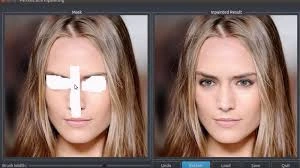
Inpainting
Advanced diffusion-based inpainting and outpainting solution that enables precise image editing and seamless canvas extension through intelligent mask-aware generation, maintaining perfect visual consistency with existing content.
Overview
Inpainting is a image utilities model available on the GenVR platform. Advanced diffusion-based inpainting and outpainting solution that enables precise image editing and seamless canvas extension through intelligent mask-aware generation, maintaining perfect visual consistency with existing content.
Key Features
- Mask-aware generation with edge-aware blending algorithms
- Dual-mode capability for both inpainting (object removal) and outpainting (canvas extension)
- High-resolution processing supporting up to 4K inputs and outputs
- Text-guided editing with prompt-based content generation control
- Style consistency preservation maintaining original lighting, texture, and color grading
- Multiple inference step configurations for quality-speed optimization
- Support for various mask formats including binary, grayscale, and partial transparency
Popular Use Cases
- Removing unwanted objects, watermarks, or photobombs from professional photographs
- Extending image canvases for social media banners, wallpapers, or print formats
- Restoring damaged, torn, or incomplete historical photographs and artwork
- Modifying product backgrounds for consistent e-commerce catalog presentation
- Creating panoramic views or wider compositions from standard camera outputs
Best For
- Professional photo retouching and restoration workflows
- Creative image expansion for different aspect ratios and formats
- E-commerce product photography cleanup and background editing
- Content creation requiring object removal or scene modification
- Digital asset management and automated image preprocessing
Limitations to Keep in Mind
- Requires precise masking for optimal results; rough or inaccurate masks may produce visible artifacts
- Complex organic textures like hair, fur, or intricate patterns may show inconsistencies at edit boundaries
- Extreme aspect ratio outpainting beyond 2:1 may result in repetitive patterns or coherence degradation
- Limited physical accuracy for complex object interactions and lighting physics in generated regions
- Processing time and computational cost scale significantly with input resolution above 2048px
Why Choose This Model
- Seamless Integration: Edits blend naturally with original image lighting, texture, and perspective without visible boundaries
- Dual Capability: Handles both object removal and image extension within a single API endpoint
- Precision Control: Advanced masking allows pixel-perfect editing of specific regions without affecting surrounding areas
- API Efficiency: Optimized inference pipeline delivers professional-grade results in under 10 seconds
- Style Preservation: Maintains artistic style and color grading consistency across edited boundaries automatically
- Resolution Flexibility: Supports high-resolution inputs without quality degradation or compression artifacts
- Text Guidance: Optional prompt-based control enables intelligent content generation matching specific creative directions
- Context Awareness: AI understands scene context and depth to generate logically appropriate content
- Workflow Automation: REST API architecture perfect for batch processing and automated content pipelines
- Professional Output: Production-ready results suitable for commercial photography and design deliverables
- Edge Blending: Sophisticated algorithms eliminate visible seams between original and generated content
- Versatile Masking: Compatible with various mask input formats and automatic mask generation capabilities
Alternatives on GenVR
- Google Nano Banana Pro Multi - Batch
- Bytedance SeedEdit 4
- Flux 2 Flex
Pricing
Billed through GenVR credits
Properties
Customizable parameters available for this model.
Required
The image to inpaint. Can contain an alpha mask. Must be jpeg, png, gif, or webp.
Text prompt for image generation
Optional
A black-and-white image that describes the part of the image to inpaint. Black areas will be preserved while white areas will be inpainted. Must have the same size as image. Optional if you provide an alpha mask in the original image. Must be jpeg, png, gif, or webp.
Random seed. Set for reproducible generation
Number of diffusion steps. Higher values yield finer details but increase processing time.
Controls the balance between adherence to the text prompt and image quality/diversity. Higher values make the output more closely match the prompt but may reduce overall image quality. Lower values allow for more creative freedom but might produce results less relevant to the prompt.
A quick option for outpainting an input image. Mask will be ignored.
GenVR Visual App
Experience the power of Inpainting through our intuitive visual interface. Experiment with prompts, adjust parameters in real-time, and download your results instantly.
Try in Web AppDeveloper API Docs
Integrate this model into your own applications. Access enterprise-grade performance, scalable infrastructure, and detailed documentation for rapid deployment.
Try in APIMore in Image Utilities
Discover other high-performance models in the same category as Inpainting.